CutCanvas
CutCanvas Studio is a friendly browser-based video editor made for quick cuts, simple overlays, and approachable timeline editing without the heavy learning curve of pro tools.
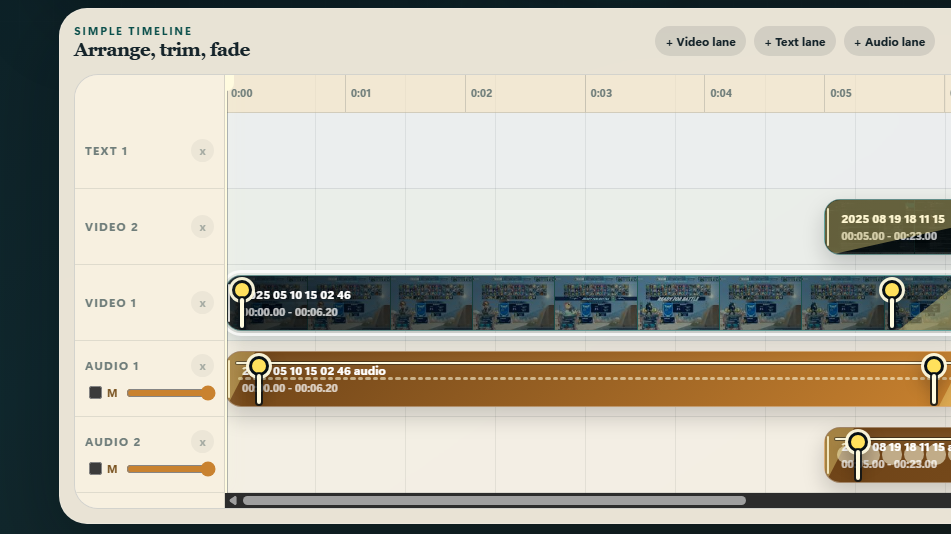
Drag in video clips, images, and audio, arrange them on a visual timeline, trim clips, add fades, place text, draw simple callout shapes, record microphone audio, and export your finished cut from the browser.
Features:
- Drag-and-drop video, image, and audio imports.
- Visual multi-lane timeline with clip filmstrips.
- Smart lane placement that avoids accidental overlapping.
- Linked video/audio clips for imported videos.
- Trim, split, move, fade, mute, and adjust audio volume.
- Text overlays with font, color, background box, shadow, and outline controls.
- Shape overlays, including donut/red-circle callouts.
- Direct canvas dragging and resizing for text and shapes.
- Microphone recording while the edit plays.
- Export settings for format, quality, and frame rate.
CutCanvas runs entirely in your browser. Your media stays local to your device and is not uploaded anywhere by the app.
Best in current Chrome or Edge. WebM export is the most reliable option. MP4 export is available when supported by the browser, but may not seek perfectly in every media player.
Leave a comment
Log in with itch.io to leave a comment.